


Gin Rummy Frenzy - Card Game
4.7544.00 Reviews
App Specs
- Version
- 1.0.0
- Updated On
- License
- Free
- Downloads
- 100,000+
- Developer
- WinPlus Games
- Categories
- Board
- Platform
- Android
Screenshots





 Analysis by AppCompare
I like card games that are easy to pick up but still give me something to think about after the first few rounds. That’s the appeal of Gin Rummy Frenzy - Card Game: it brings a familiar rummy format to a phone, with social play and competitive options alongside solo games. I’d consider it most appealing when I want a quick match or a reason to practice, rather than a long, uninterrupted gaming session.
A phone game that can fit around a shared routine
For a household that already enjoys card games, a digital version can be a handy way to play when the table is busy or everyone is in a different place. One person might take a short solo game during a quiet break, while another can try a multiplayer match later. That flexibility is useful, though it is not the same as gathering around a physical deck: players need their own access to the game and a suitable moment to focus.
Because Gin Rummy depends on watching discards and remembering what has already appeared, I would not treat a match as something to play while someone else is trying to use the same screen. Even a brief interruption can make it harder to follow the hand. For shared-device use, the practical approach is to agree on turns with the phone before starting, and to finish a round before passing it along.
Set expectations before handing over the phone
The game is free to download, but it includes in-app purchases, with items priced from $0.99 to $99.99. That range is worth discussing if children or other family members use the device. I would check purchase settings on the device and make sure everyone knows that optional spending is separate from simply installing and playing. A free starting point does not mean every in-game option is free.
It also helps to agree on a simple account boundary: use the intended player’s own account where possible, and avoid assuming that a shared phone automatically makes everyone’s progress, messages, or social activity private. I would review the game together before letting a younger player use its social options, then decide what feels comfortable for your household. These are sensible habits for any game with multiplayer and chat, not a claim that the app provides family controls.
Make multiplayer fit the moment
The social side is a draw if you already have friends who play, but it can also change the feel of a casual card game. Before inviting someone, agree on whether you want a relaxed match or a more competitive session; that small bit of coordination helps avoid mismatched expectations. If nobody is available, solo play gives you a way to spend time with the game without depending on another person being online.
For a realistic everyday use, I can imagine opening it while waiting for a ride or taking a short break, then choosing a solo round if I have only a few minutes. If I have plans to play with a friend, I would coordinate first rather than assume we can both jump in at the same time. That makes the social feature feel like a deliberate part of the activity instead of an interruption to whatever else is happening.
Worth Reading Before You Choose

Flipboard Shows What News Apps Must Do Beyond the Feed

Switching to Android Auto Means Rethinking Your Driving Routine

Google Calendar Makes a Crowded Week Easier to Manage

Ludo King Makes the Most of the Minutes Between Plans

Baby Panda World Brings Quick Play to Modern Phones, but Its Game Library Feels Busy

ESPN’s Live Game View Makes Following Close Games Easier
How the game feels once you settle in
The game is a board-style card title from WinPlus Games. It has a 4.6 average from around 6.7K ratings, and more than 100K installs. Those figures suggest that it has found an audience, but they do not tell me whether its style suits a particular player. What matters more is whether you enjoy Gin Rummy’s mix of short-term choices, memory, and reading an opponent’s discards.
Getting Started with Gin Rummy Frenzy
First things first, downloading and setting up Gin Rummy Frenzy is a breeze. It's available on both Android and iOS, so no one misses out on the fun. Once you’ve got it installed, you’re greeted with a user-friendly interface that makes navigation a piece of cake. The app has vibrant graphics and a smooth design, making your gameplay visually pleasing and easy to handle.
The Android release is version 0.4.2 and lists Android 7.1 as its minimum operating system requirement. It is free to install, with optional in-app purchases. Its Teen content rating is another reason I would check that the game is appropriate for the person using it, especially if the phone is shared. The rating is useful context, but I would still make my own decision about multiplayer and chat in light of the player’s age and comfort.
Game Modes Galore
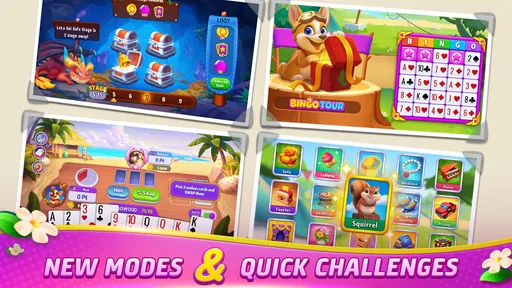
One of the coolest features of Gin Rummy Frenzy is its variety of game modes. You can choose to play in single-player mode if you’re looking to practice or just want some solo time. But if you’re feeling competitive, the multiplayer mode is where the real excitement lies. You can challenge players from around the world, and trust me, the adrenaline rush is real! There’s also a tournament mode, which is perfect for those who love a structured competition. The thrill of climbing the leaderboard is unmatched.
These modes give the game a useful range, but I would choose based on the kind of attention I have available. Solo play is the sensible place to learn the rhythm of a hand without needing to coordinate with another person. Multiplayer makes more sense when I can stay focused and have time to see a match through. A tournament is best when I want a more goal-oriented session, not when I am only looking for a quick distraction.
Compared with a physical deck, the phone version removes setup and makes it easier to find an opponent, but it cannot reproduce the face-to-face atmosphere of watching friends play across a table. Compared with a simple offline card game, its multiplayer and tournament options offer more social competition, while also making the experience less self-contained. If you want quiet, predictable play without online interaction, a basic solo card game may suit you better.
Features that Keep You Hooked
This isn’t just a simple card game app; it’s packed with features that enhance your gaming experience. The app includes daily challenges and rewards which are a great way to earn some extra coins. Plus, the more you play, the more you unlock achievements and bonuses. It’s like the app is constantly rewarding you for being awesome!
My practical tip is to treat challenges and rewards as optional prompts, not as a reason to keep playing after I have had enough. They can give a short session a clear purpose, but reward loops are easy to let run longer than intended. I would set a stopping point before starting, especially when sharing a device or fitting a game into a break.
The app also has an interactive tutorial mode. For those who are new to Gin Rummy or just need a refresher, this guide is incredibly helpful. It covers all the basics and some advanced strategies, so you’ll be playing like a pro in no time.
For a newcomer, I would use the tutorial as a warm-up and then try a solo game to apply one idea at a time. That is more useful than trying to memorize every strategy before playing. More experienced players may prefer to go straight into a match, but returning to a guide can still help if a rule or decision has become rusty.
Social Elements and Community
Another aspect I love about Gin Rummy Frenzy is the social interaction it fosters. You can connect with friends or make new ones within the game. There’s a chat feature that allows you to communicate with your opponents, which adds a layer of fun and camaraderie to the game. Nothing beats a little friendly banter, right?
Chat is also the part I would approach with the clearest boundaries in a shared household. I would remind younger players not to share personal details and would stay nearby while they explore communication with other players. Adults who prefer to keep a game quiet may find this social layer unnecessary; in that case, solo play is the more comfortable fit.
Moreover, the app has a thriving community. You can join clubs or create your own, where you can share tips, strategies, and just have a good time with fellow Gin Rummy enthusiasts. It’s like having a global card-playing circle at your fingertips.
Clubs and conversation can make the game feel more welcoming if you enjoy being part of a group, but they are not essential to enjoying a hand of rummy. I would start with the actual card play, then explore the community side only if it adds something I want. That keeps social activity from becoming a chore or a condition for enjoying the core game.
Performance and Smooth Gameplay
In terms of performance, Gin Rummy Frenzy runs like a dream. The app is quick to load, and I didn’t experience any lag or crashes during my play sessions. The developers have clearly put a lot of effort into ensuring a seamless experience, and it shows. Whether you’re on Wi-Fi or data, the app maintains its speed, which is crucial for those intense multiplayer matches.
As with any online match, I would avoid starting a competitive game when I know I may need to leave or when my connection is unreliable. A short solo session is a better choice if I cannot give a match my attention. That is a small but useful distinction: the best mode depends not only on skill, but on how much uninterrupted time I actually have.
The game’s AI is also worth mentioning. If you’re playing in single-player mode, the AI offers just the right amount of challenge without being too frustrating. It’s perfect for honing your skills before taking on real opponents.
Practice against the AI is especially handy for testing a decision without the pressure of keeping another player waiting. I would use it to focus on one habit, such as tracking which cards have been discarded, rather than treating each solo game as a measure of overall ability. Then, when I move to multiplayer, I can pay attention to the opponent’s choices as well as my own hand.
Who will enjoy it, and who may want something else
I would recommend this game to people who already like Gin Rummy, want a convenient way to practice, or enjoy combining card play with social competition. It is also a reasonable pick for someone who likes having both solo and multiplayer choices instead of relying on only one style. The tutorial gives new players a starting point, while challenges and tournaments offer reasons to return for those who like goals.
I would steer away from it if you want a purely offline experience, dislike in-game chat, or prefer a physical card game’s face-to-face pace. It may also be a poor fit for someone who finds reward systems hard to put down or who does not want optional purchases in a game. In those cases, a basic offline rummy app or a real deck with friends is a better match than trying to ignore features you would rather not use.
For families, I would treat it as a shared activity only when the players are comfortable with the Teen rating and the online social elements. It can be a fun way to compare strategies or introduce the broad flow of Gin Rummy, but I would not assume that everyone should use the same profile or that the phone’s owner will want to share their game space. A little planning around turns, purchases, and chat makes the household experience more predictable.
Final Thoughts
All in all, Gin Rummy Frenzy - Card Game is a fantastic app for anyone who loves card games. It combines classic gameplay with modern features, creating an addictive and enjoyable experience. Whether you’re playing casually or diving deep into competitive matches, there’s plenty to love about this game.
If you haven’t already, give it a try. You might just find your new favorite pastime. So, grab your phone, download the app, and get ready for some rummy fun. Happy gaming!
Pros
- User-friendly interface for easy navigation.
- Engaging graphics enhance gameplay experience.
- Offers multiplayer mode for social interaction.
- Regular updates keep content fresh.
- Low data consumption for uninterrupted play.
Cons
- Frequent ads can disrupt game flow.
- Limited offline features available.
- In-app purchases can be pricey.
- Occasional connectivity issues reported.
- Game progress may reset unexpectedly.
FAQs for Gin Rummy Frenzy - Card Game
What is Gin Rummy Frenzy and how does it differ from other card games?
Gin Rummy Frenzy is a digital adaptation of the classic card game Gin Rummy, designed for both Android and iOS platforms. Unlike traditional card games, it offers a fast-paced, competitive environment with various modes and challenges. The app includes features like online multiplayer and tournaments, which set it apart from other card games.
Is Gin Rummy Frenzy free to play, and are there in-app purchases?
Gin Rummy Frenzy is free to download and play, providing a basic gaming experience at no cost. However, it offers in-app purchases for additional features such as extra coins, premium card decks, and ad-free gameplay. These purchases are optional and designed to enhance the overall experience.
What are the system requirements for installing Gin Rummy Frenzy on my device?
To install Gin Rummy Frenzy, Android users need a device running version 5.0 or higher, while iOS users require version 10.0 or later. Ensuring your device meets these requirements will provide a smooth gaming experience. Additionally, a stable internet connection is recommended for online features.
Can I play Gin Rummy Frenzy offline, or is an internet connection necessary?
Gin Rummy Frenzy offers both online and offline modes. While you can enjoy solo play offline, features such as multiplayer matches, leaderboards, and tournaments require an internet connection. Playing offline is a great way to practice and hone your skills without the need for connectivity.
Does Gin Rummy Frenzy support multiplayer gameplay, and how does it work?
Yes, Gin Rummy Frenzy supports multiplayer gameplay, allowing you to compete against friends or players worldwide. The app includes options for creating private rooms, participating in tournaments, and engaging in quick matches. Multiplayer mode enhances the competitive aspect and provides a dynamic gaming experience.


